How to Use the L298N Motor Driver with Arduino: Wiring and Code
The L298N motor-driver module allows Arduino to control two brushed DC motors or one bipolar stepper motor. Arduino selects direction and speed, while the module supplies the motors with current from an external power source. This separation is essential: Arduino I/O pins only provide logic signals and must not power motors directly.
What is the L298N module?
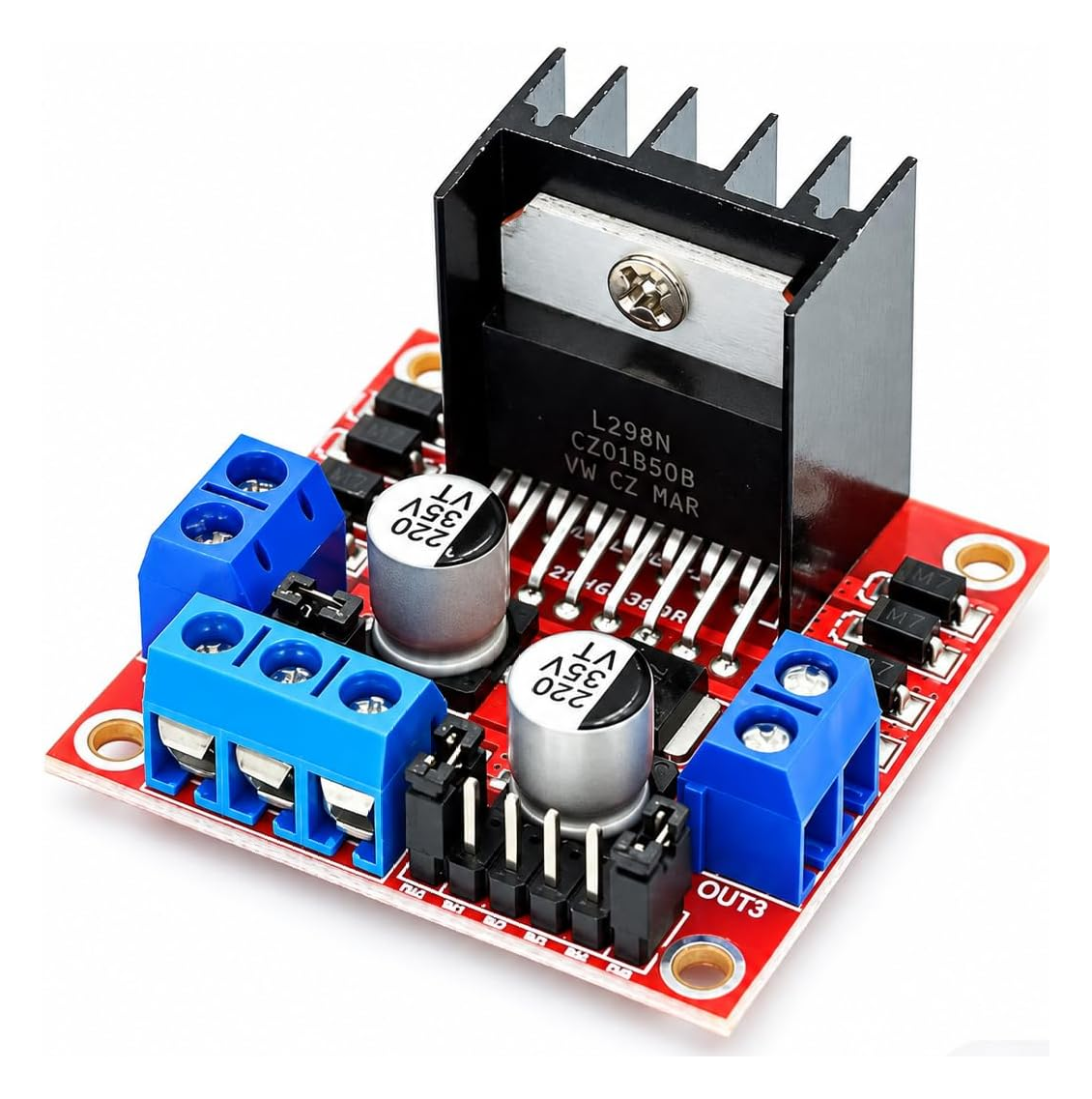
The L298N integrated circuit contains two complete H-bridges, called channel A and channel B. Each H-bridge can reverse the polarity applied to a motor, allowing the same motor to rotate in both directions. The channels are independent, so two motors can be controlled separately.
The module adds screw terminals, flyback diodes, capacitors, a heat sink and, on common boards, a 5 V regulator. It is not a stand-alone speed controller: it receives IN1-IN4 and ENA/ENB commands from Arduino.
How an H-bridge works
An H-bridge uses four electronic switches arranged around a motor. One switch pair sends current through the motor in one direction; the opposite pair reverses the current and changes motor direction.
When the two inputs of a channel are different, the motor rotates. When they are equal and the channel is enabled, the L298N performs a fast stop. When ENA or ENB is LOW, that bridge is disabled and the motor enters a freer-running stop.
L298N module pinout and components
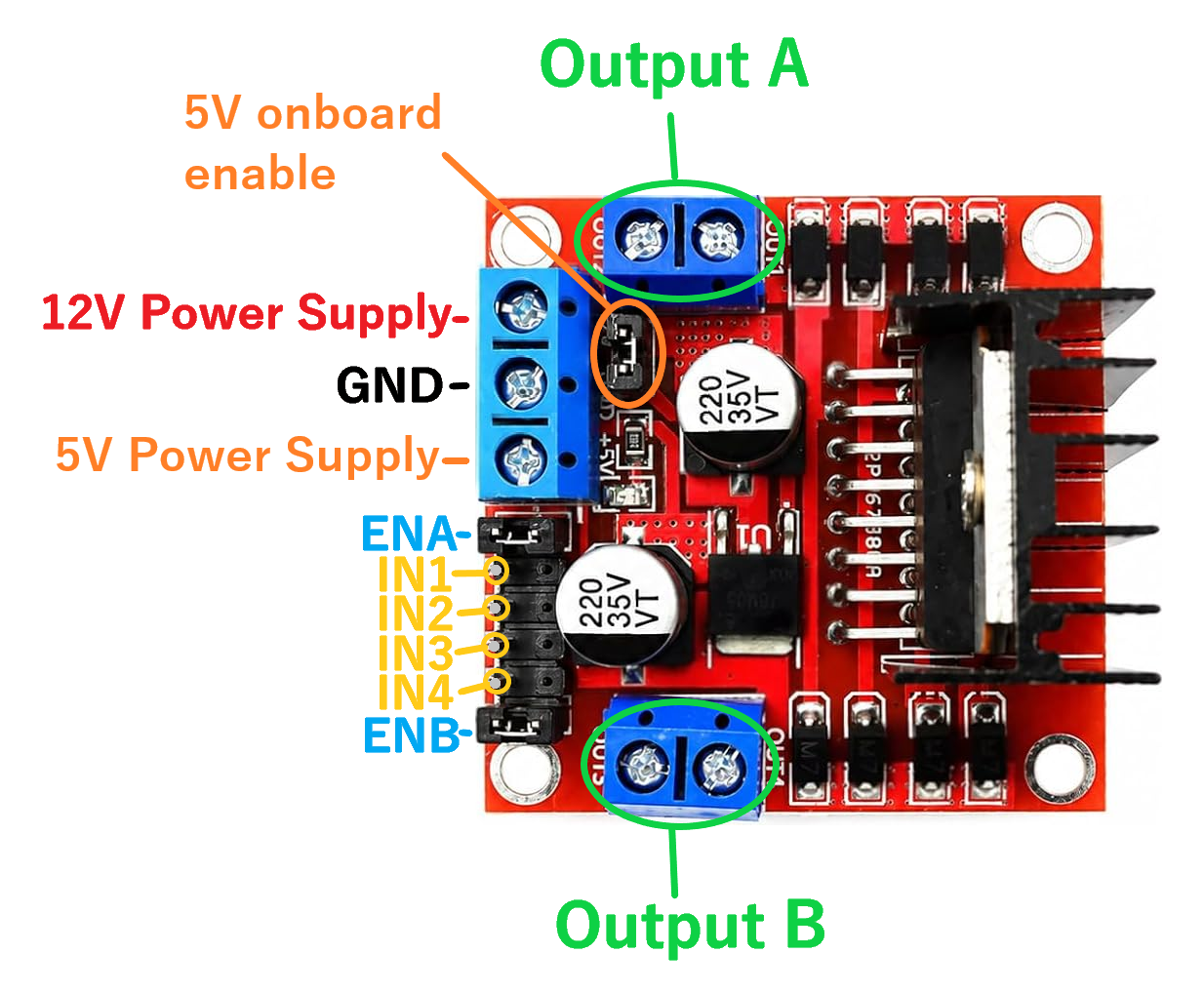
Output A and Output B
These are the two motor terminal pairs. Output A is controlled by IN1, IN2 and ENA; Output B is controlled by IN3, IN4 and ENB. The order of the motor wires determines which direction is called “forward”. If a motor turns the wrong way, swap its wires or reverse the code logic.
Power terminals: VS, GND and 5V
The terminal often labeled 12V or VS receives motor power. The 12V label does not mean that every project must use 12 V: choose a voltage compatible with the motors and module. The center terminal is GND; the third is the 5 V logic connection associated with the onboard regulator.
IN1, IN2, IN3 and IN4
These are direction-control logic inputs. IN1 and IN2 control channel A; IN3 and IN4 control channel B. They connect to ordinary Arduino digital pins and are driven with digitalWrite().
ENA and ENB
They enable the two H-bridges. With the corresponding jumper fitted, the enable input remains HIGH and the motor runs at the maximum available speed. For speed control, remove the jumper and connect ENA or ENB to an Arduino PWM pin; in the supplied circuit ENA uses pin 10 and ENB uses pin 5.
“5V onboard enable” jumper
On common modules, this jumper connects the onboard regulator to the L298N logic supply. When the jumper is fitted and the motor supply is suitable for that regulator, logic power is generated onboard and the 5 V terminal may act as an output. Do not connect Arduino 5 V to that terminal at the same time unless you have verified the exact module configuration.
When the jumper is removed, the logic side generally needs an external regulated 5 V supply through the 5 V terminal. Commercial modules are not all identical, so check the board labels and documentation for your version.
Diodes, capacitors and heat sink
Motors are inductive loads and can generate voltage spikes when current changes quickly. The module diodes provide a recirculation path for that current. The capacitors stabilize the supply, while the heat sink removes some of the heat generated by the L298N.
Motor-control truth table
| Enable | Input 1 | Input 2 | Result |
|---|---|---|---|
| HIGH | HIGH | LOW | Rotation in one direction |
| HIGH | LOW | HIGH | Rotation in the opposite direction |
| HIGH | LOW | LOW | Fast stop |
| HIGH | HIGH | HIGH | Fast stop |
| LOW | Any | Any | Bridge disabled, free-running stop |
The same table applies to IN3 and IN4 on channel B. The words “forward” and “reverse” depend on the physical motor wiring.
How PWM controls speed
Arduino UNO does not generate a continuously variable analog voltage on normal PWM pins. Instead, analogWrite() generates a rapid pulse sequence: increasing the percentage of time spent HIGH increases the average power delivered to the motor.
The value ranges from 0 to 255: 0 disables the channel, 255 requests maximum power and intermediate values produce intermediate speeds. ENA and ENB must therefore connect to pins marked with ~, and their jumpers must be removed.
Basic Arduino UNO circuit with two motors
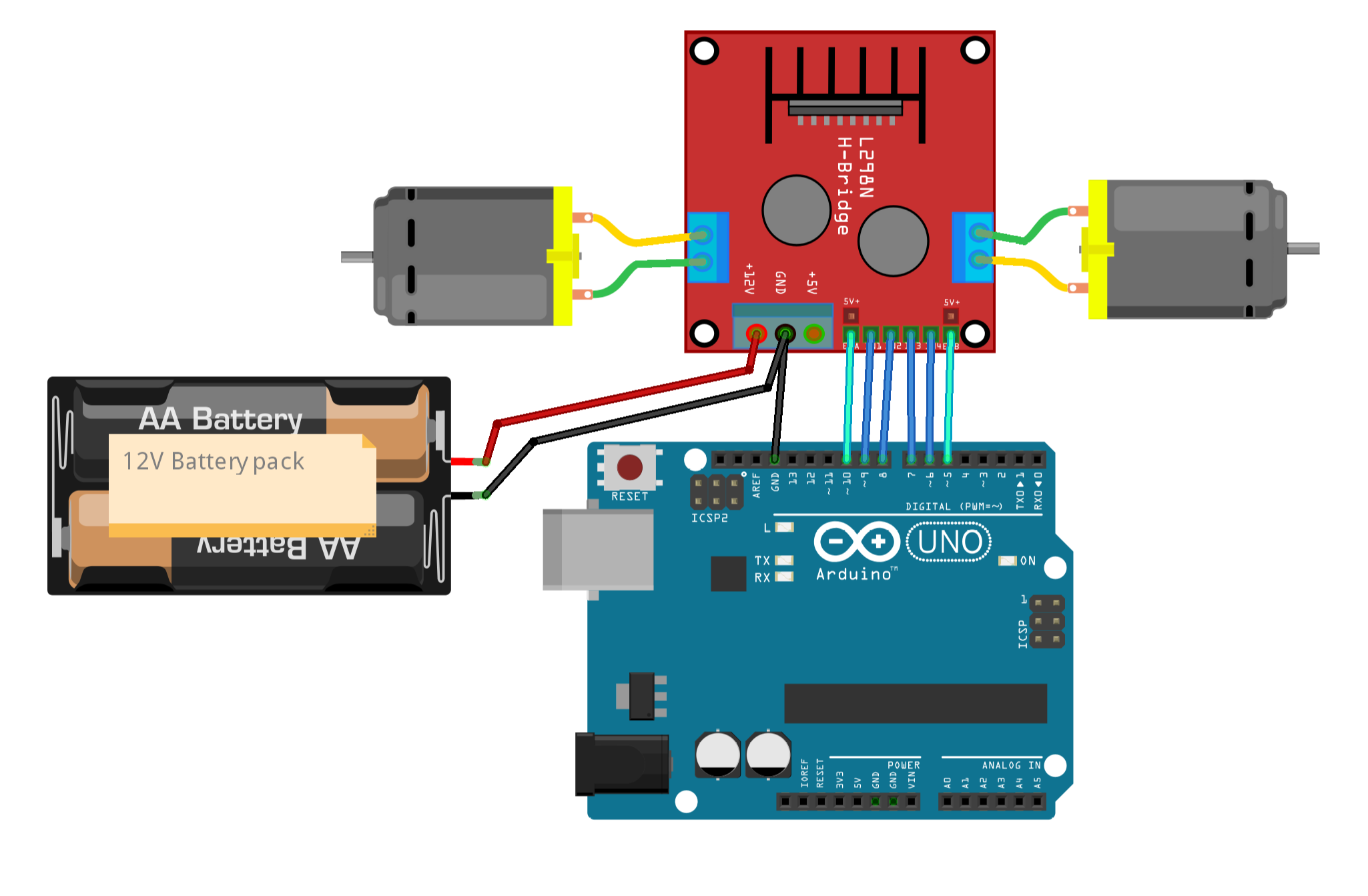
- ENA → Arduino PWM pin 10
- IN1 → Arduino pin 9
- IN2 → Arduino pin 8
- IN3 → Arduino pin 7
- IN4 → Arduino pin 6
- ENB → Arduino PWM pin 5
- Output A → first motor
- Output B → second motor
- motor-supply positive → module VS/12V terminal
- supply negative → module GND
- module GND → Arduino GND
A common ground is essential: Arduino and the L298N must interpret HIGH and LOW relative to the same reference. Arduino can be powered through USB or another suitable supply; never connect the motor voltage to Arduino's 5 V pin.
Choose the external supply according to the motor rated voltage and, especially, its starting and stall current. The diagram shows the module power input, but it does not mean that every motor should receive 12 V.
Fundamental code for two motors
// https://nemiatools.com

// Channel A - left motor
const byte ENA = 10; // PWM pin for speed control
const byte IN1 = 9;
const byte IN2 = 8;

// Channel B - right motor
const byte IN3 = 7;
const byte IN4 = 6;
const byte ENB = 5;  // PWM pin for speed control

void setMotorA(int speed) {
  speed = constrain(speed, -255, 255);

  if (speed > 0) {
    digitalWrite(IN1, HIGH);
    digitalWrite(IN2, LOW);
    analogWrite(ENA, speed);
  }
  else if (speed < 0) {
    digitalWrite(IN1, LOW);
    digitalWrite(IN2, HIGH);
    analogWrite(ENA, -speed);
  }
  else {
    analogWrite(ENA, 0);
    digitalWrite(IN1, LOW);
    digitalWrite(IN2, LOW);
  }
}

void setMotorB(int speed) {
  speed = constrain(speed, -255, 255);

  if (speed > 0) {
    digitalWrite(IN3, HIGH);
    digitalWrite(IN4, LOW);
    analogWrite(ENB, speed);
  }
  else if (speed < 0) {
    digitalWrite(IN3, LOW);
    digitalWrite(IN4, HIGH);
    analogWrite(ENB, -speed);
  }
  else {
    analogWrite(ENB, 0);
    digitalWrite(IN3, LOW);
    digitalWrite(IN4, LOW);
  }
}

void stopMotors() {
  setMotorA(0);
  setMotorB(0);
}

void setup() {
  pinMode(ENA, OUTPUT);
  pinMode(IN1, OUTPUT);
  pinMode(IN2, OUTPUT);
  pinMode(IN3, OUTPUT);
  pinMode(IN4, OUTPUT);
  pinMode(ENB, OUTPUT);

  stopMotors();
}

void loop() {
  // Both motors forward at medium speed
  setMotorA(180);
  setMotorB(180);
  delay(2000);

  stopMotors();
  delay(1000);

  // Both motors in reverse
  setMotorA(-180);
  setMotorB(-180);
  delay(2000);

  stopMotors();
  delay(1000);

  // Turn in place: the motors rotate in opposite directions
  setMotorA(180);
  setMotorB(-180);
  delay(2000);

  stopMotors();
  delay(1000);
}
setMotorA() and setMotorB() accept values from -255 to 255. A positive value selects one direction, a negative value reverses the inputs and 0 disables the channel. constrain() prevents values outside the analogWrite() range.
Inside loop(), the motors run forward, stop, reverse and finally rotate in opposite directions. On a two-wheel robot, the final combination turns the robot in place.
Minimal one-motor example
// One motor on channel A
const byte ENA = 10;
const byte IN1 = 9;
const byte IN2 = 8;

void setup() {
  pinMode(ENA, OUTPUT);
  pinMode(IN1, OUTPUT);
  pinMode(IN2, OUTPUT);
}

void loop() {
  // Forward
  digitalWrite(IN1, HIGH);
  digitalWrite(IN2, LOW);
  analogWrite(ENA, 200);
  delay(2000);

  // Free-running stop: ENA set to 0
  analogWrite(ENA, 0);
  delay(1000);

  // Reverse
  digitalWrite(IN1, LOW);
  digitalWrite(IN2, HIGH);
  analogWrite(ENA, 200);
  delay(2000);

  analogWrite(ENA, 0);
  delay(1000);
}
Voltage drop and heating
The L298N uses bipolar transistors and introduces a significant voltage drop. The motor therefore receives less voltage than the value applied to VS, especially as current rises. This reduces efficiency and converts part of the electrical energy into heat.
The IC can reach high currents under datasheet conditions, but a small commercial module should not automatically be treated as capable of supplying 2 A continuously per channel. Usable current depends on cooling, voltage, wiring and board quality. Always check the motor stall current, not only its no-load current.
Important power rules
- do not power motors from Arduino's 5 V pin;
- always connect Arduino GND to module GND;
- use a source capable of supplying motor starting current;
- do not change wiring while power is applied;
- remove ENA/ENB jumpers when using PWM speed control;
- verify the regulator-jumper function before using the 5 V terminal;
- if the heat sink becomes very hot, stop the test and reduce the load.
L298N applications
- two-wheel Arduino robots and rovers;
- small remote-controlled vehicles;
- conveyor belts and reversible mechanisms;
- brushed-DC motor actuators;
- bipolar stepper control with the correct phase sequence.
The L298N is intended for brushed DC motors and some bipolar stepper motors. It is not the correct driver for three-phase brushless motors.
Common problems
The motors do not move
Check the external supply, common ground and ENA/ENB connections. If the enable jumpers have been removed, Arduino must output a PWM value greater than zero.
One motor turns the wrong way
Swap the two motor wires or exchange HIGH and LOW in the function for that channel.
Arduino resets when a motor starts
The source may not supply enough current, or motor noise may be reaching the logic circuit. Separate the supplies correctly, keep the common ground and use short, solid wiring.
The motor is much slower than expected
Consider the L298N voltage drop, battery charge and required motor current. Also verify that analogWrite() is not using a value that is too low.
The module becomes very hot
The motor may be drawing excessive current or may be stalled. Turn the circuit off, measure stall current and consider a more efficient driver for heavier loads.