How to Use the RC522 RFID Reader with Arduino
The RC522 RFID module allows Arduino to identify 13.56 MHz RFID cards and key fobs. It is widely used for electronic locks, access control, attendance systems and projects where Arduino needs to know which tag has been presented. This lesson starts from zero: how RFID works, what every RC522 pin does, how to wire it to an Arduino UNO and how to read a card UID.
What is RFID?
RFID stands for Radio Frequency Identification. An RFID system mainly consists of a reader and a tag, such as a card or key fob. The reader creates an electromagnetic field; a passive tag placed close enough to it obtains the energy needed to operate and sends its data back.
The RC522 works with tags compatible with the ISO/IEC 14443A interface, commonly used by MIFARE cards and several RFID/NFC tags.
Module image
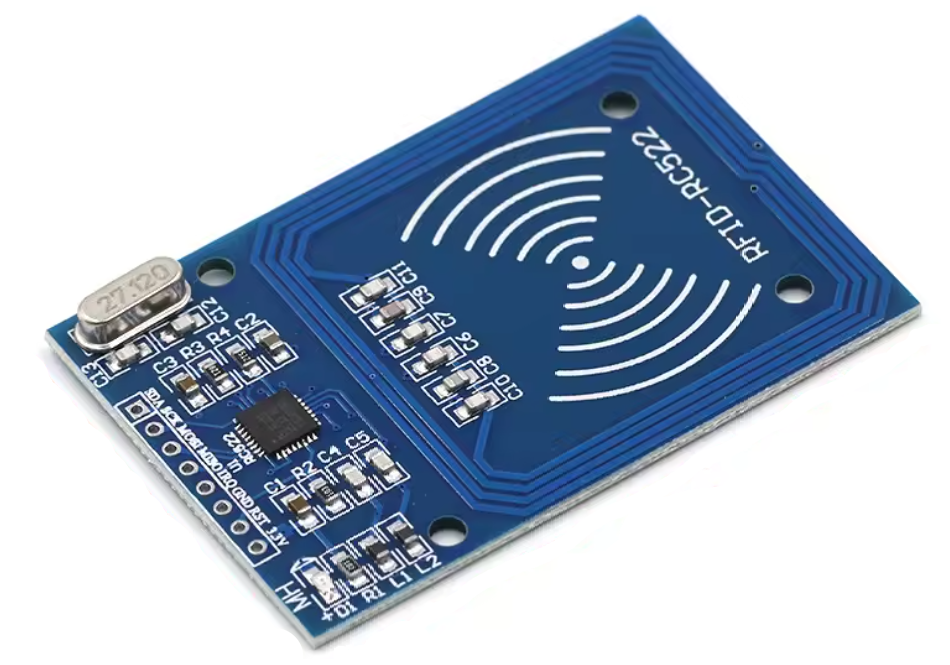
How the RC522 module works
The module is built around the MFRC522 integrated circuit. Arduino communicates with the reader while the reader handles radio communication with the card. When a card enters the antenna field, the module can detect it and read its UID.
The UID is a sequence of bytes used to identify the tag. Its length can vary, so good code should use the real UID length instead of assuming every card always has four bytes.
The RC522 can also read and write memory areas on some compatible tags, but that requires authentication and careful sector handling. For beginners, reading the UID is the best place to start.
RC522 and SPI
With Arduino, the RC522 is normally used through SPI, or Serial Peripheral Interface. SPI uses separate lines for the clock, data sent by Arduino, data returned by the reader and device selection.
An important detail: the RC522 pin labeled SDA acts as SS/CS, or Slave Select / Chip Select, when the module is used with SPI. It is not the normal I2C SDA signal.
What every RC522 pin does
3.3V
Module power. The MFRC522 is a 3.3 V device, so do not connect this pin to the Arduino UNO 5 V output.
RST
Reset input. In this lesson it connects to digital pin 9.
GND
Ground. Connect it to Arduino GND.
MISO
Master In Slave Out: the RC522 uses this line to send data to Arduino. On Arduino UNO it is pin 12.
MOSI
Master Out Slave In: Arduino uses this line to send data to the RC522. On Arduino UNO it is pin 11.
SCK
SPI clock. On Arduino UNO it is pin 13.
SDA / SS / CS
In SPI mode this is the Chip Select line. In this lesson it connects to pin 10.
IRQ
Interrupt output. Basic MFRC522 projects normally leave it unconnected.
Important 3.3 V warning
Power the module from Arduino's 3.3V pin. The Arduino UNO uses 5 V logic on its digital outputs. Many hobby examples connect the SPI lines directly and often work, but for a more electrically correct and robust circuit, use a level shifter on signals driven from the UNO to the RC522. The MISO signal travels from the 3.3 V RC522 to the UNO and can normally be read directly.
How to wire the RC522 to Arduino UNO
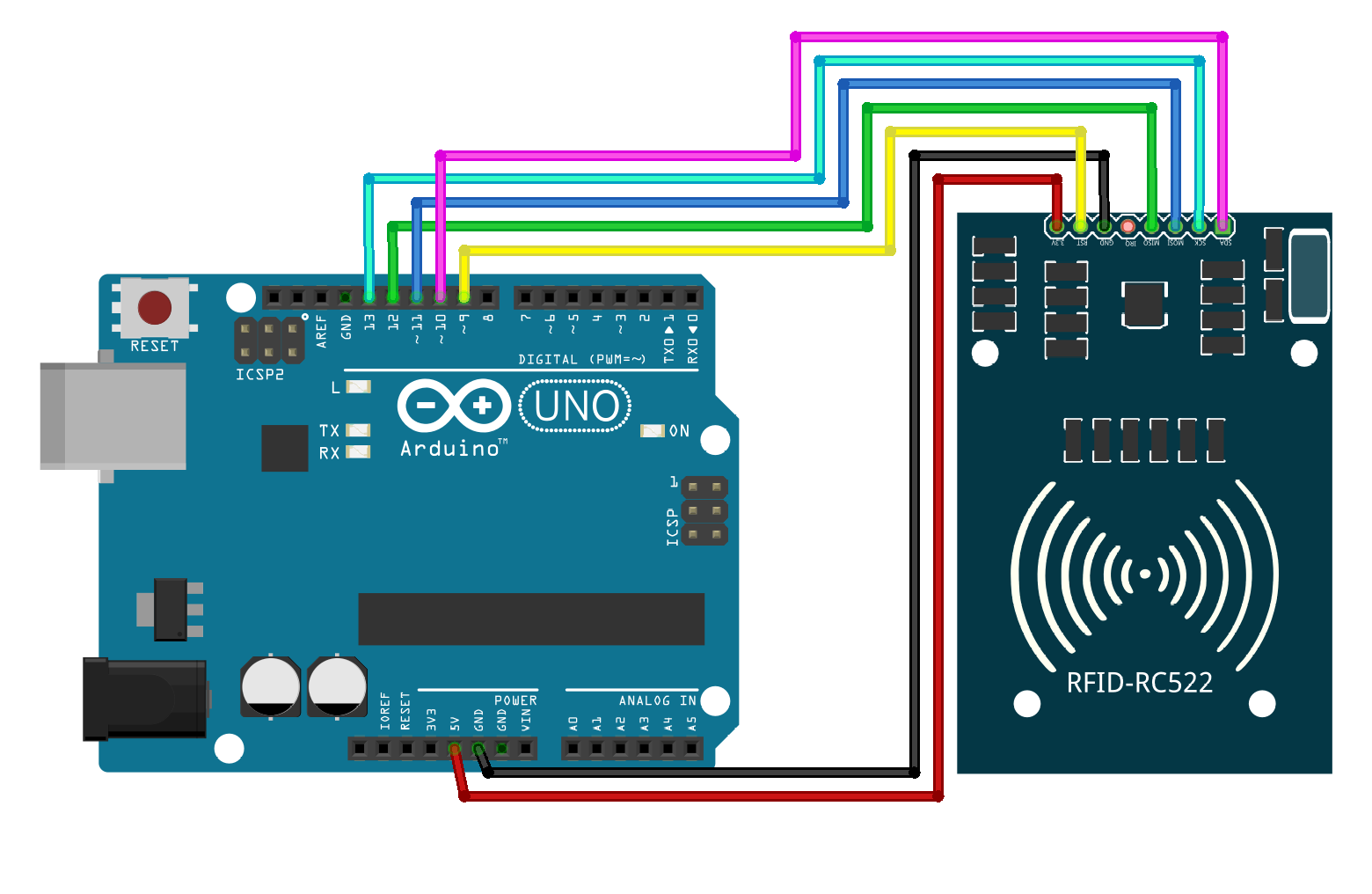 In this example, I did not use a level shifter.
- RC522 3.3V → Arduino 3.3V
- RC522 GND → Arduino GND
- RC522 RST → Arduino pin 9
- RC522 SDA/SS → Arduino pin 10
- RC522 MOSI → Arduino pin 11
- RC522 MISO → Arduino pin 12
- RC522 SCK → Arduino pin 13
- RC522 IRQ → not connected
These are the typical hardware SPI pins on an Arduino UNO. Mega, Leonardo and other boards use different hardware SPI pin locations.
Install the MFRC522 library
The SPI library is already included with Arduino. Open the Library Manager, search for MFRC522 and install MFRC522 by GithubCommunity.
#include <SPI.h>
#include <MFRC522.h>
First sketch: read the UID
// https://nemiatools.com
#include <SPI.h>
#include <MFRC522.h>

const byte SS_PIN = 10;
const byte RST_PIN = 9;

MFRC522 rfid(SS_PIN, RST_PIN);

void setup() {
  Serial.begin(9600);

  SPI.begin();
  rfid.PCD_Init();

  Serial.println("Place an RFID card near the reader...");
}

void loop() {
  if (!rfid.PICC_IsNewCardPresent()) {
    return;
  }

  if (!rfid.PICC_ReadCardSerial()) {
    return;
  }

  Serial.print("UID: ");

  for (byte i = 0; i < rfid.uid.size; i++) {
    if (rfid.uid.uidByte[i] < 0x10) {
      Serial.print("0");
    }

    Serial.print(rfid.uid.uidByte[i], HEX);

    if (i < rfid.uid.size - 1) {
      Serial.print(" ");
    }
  }

  Serial.println();
  rfid.PICC_HaltA();
}
Open the Serial Monitor at 9600 baud and present a card. You will see a sequence similar to UID: A3 2F 91 0C. Your card will have a different value.
How the code works
SPI.begin() initializes the SPI bus and rfid.PCD_Init() initializes the reader. In the loop, PICC_IsNewCardPresent() checks for a new card and PICC_ReadCardSerial() reads its information, including the UID.
The UID length is stored in rfid.uid.size, while the individual bytes are stored in rfid.uid.uidByte[]. Finally, PICC_HaltA() properly ends communication with that card.
Example: recognize an authorized card
After reading your UID, you can store it in the sketch and compare it with the detected card. This example turns on the Arduino UNO built-in LED when the authorized card is recognized.
// https://nemiatools.com
#include <SPI.h>
#include <MFRC522.h>

const byte SS_PIN = 10;
const byte RST_PIN = 9;
const byte LED_PIN = LED_BUILTIN;

MFRC522 rfid(SS_PIN, RST_PIN);

// Replace these bytes with your card UID
const byte authorizedUID[] = {0xDE, 0xAD, 0xBE, 0xEF};
const byte authorizedSize = sizeof(authorizedUID);

bool isAuthorized() {
  if (rfid.uid.size != authorizedSize) {
    return false;
  }

  for (byte i = 0; i < authorizedSize; i++) {
    if (rfid.uid.uidByte[i] != authorizedUID[i]) {
      return false;
    }
  }

  return true;
}

void setup() {
  Serial.begin(9600);
  pinMode(LED_PIN, OUTPUT);

  SPI.begin();
  rfid.PCD_Init();

  Serial.println("RFID system ready");
}

void loop() {
  if (!rfid.PICC_IsNewCardPresent()) return;
  if (!rfid.PICC_ReadCardSerial()) return;

  if (isAuthorized()) {
    Serial.println("Access granted");
    digitalWrite(LED_PIN, HIGH);
    delay(1000);
    digitalWrite(LED_PIN, LOW);
  }
  else {
    Serial.println("Access denied");
  }

  rfid.PICC_HaltA();
}
Replace DE AD BE EF with the UID printed by the first sketch. If your card uses 7 or 10 UID bytes, include all of them; the code automatically uses the array size.
Most useful MFRC522 functions
- PCD_Init() → initializes the reader.
- PICC_IsNewCardPresent() → checks for a newly presented card.
- PICC_ReadCardSerial() → reads the UID and basic card information.
- PICC_HaltA() → ends communication with the current card.
- uid.size → stores the UID length.
- uid.uidByte[] → stores the UID bytes.
- PICC_GetType() → can determine the detected PICC type.
RC522 applications
- Electronic locks.
- Card-based access control.
- Attendance systems.
- Personalized profiles or menus.
- Robots or devices that react to different tags.
- Triggering different functions depending on the card.
Is the UID a password?
No. Comparing only the UID is excellent for learning and for non-critical projects, but it should not be treated as strong security. Some tags can have cloneable or reproducible identifiers. Real access-control systems should use proper authentication instead of relying only on UID comparison.
Common problems
The reader detects no cards
Check the 3.3 V supply, GND, SDA/SS, MOSI, MISO and SCK. Also verify that RST is connected to the pin declared in the sketch.
The sketch does nothing when a card is presented
Make sure SPI.begin() runs before PCD_Init() and that the tag is compatible with the reader.
The UID is corrupted
Check the wiring and keep the SPI connections reasonably short. Unstable connections can cause unreliable readings.
The same card is read only once
Move it away and present it again. PICC_IsNewCardPresent() is designed to detect a newly presented tag.