How to Build a Parking Sensor with Arduino
Description
This project is a front and rear parking sensor system built around an Arduino board, two ultrasonic distance sensors, a buzzer, and three warning LEDs. One ultrasonic sensor monitors the area in front of the vehicle, while the other monitors the area behind it. The Arduino continuously measures both distances, compares them, and reacts to the closest obstacle. Depending on how near the obstacle is, the system activates a green, yellow, or red LED together with a buzzer that beeps at different speeds. This project is an excellent introduction to ultrasonic distance measurement, parking assistance systems, acoustic warnings, visual indicators, and Arduino-based safety applications. It can be used as a foundation for car parking sensors, robot obstacle detection, reversing assistance systems, garage safety devices, or other distance-based alert systems.
Required components:
- 1x Arduino UNO
- 2x HC-SR04 ultrasonic sensor
- 3x LEDs (of different colours)
- 1x Buzzer
- 3x 220Ω LED series resistor (one per LED)
- Jumper Cables (and optional breadboard)
Schematic:
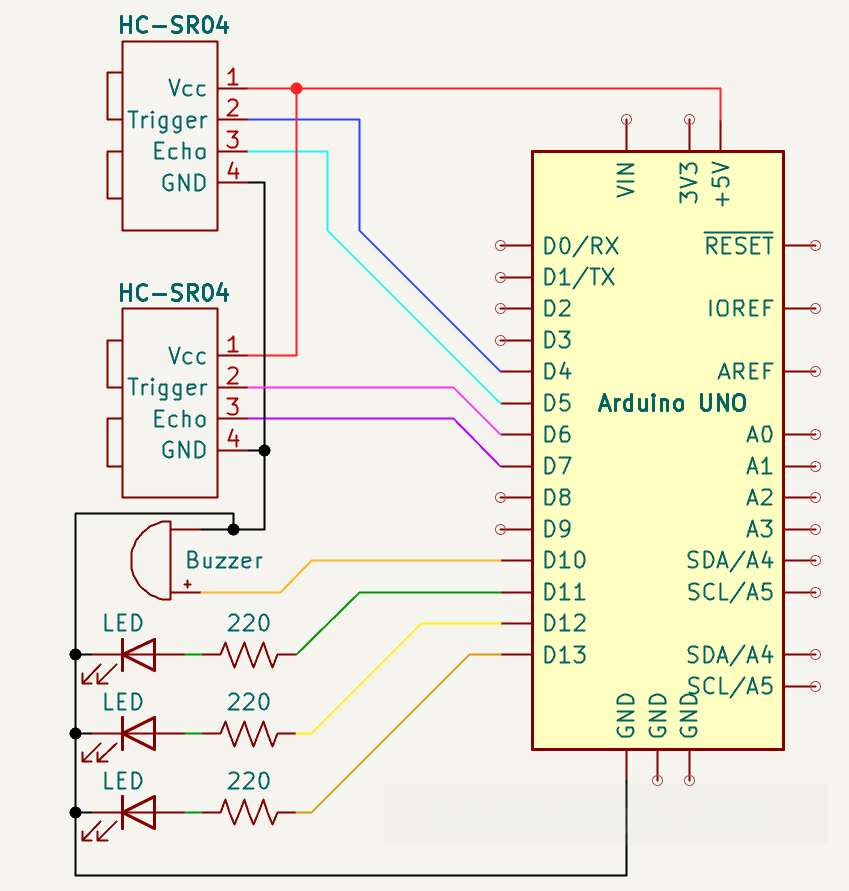
CODE:
// https://nemiatools.com
// Front sensor
const int F_trigPin = 4; // Front trigger pin
const int F_echoPin = 5; // Front echo pin

// Rear sensor
const int B_trigPin = 6; // Rear trigger pin
const int B_echoPin = 7; // Rear echo pin

const int buzzer = 10; // Buzzer output pin
const int green  = 11; // Green LED pin
const int yellow = 12; // Yellow LED pin
const int red    = 13; // Red LED pin

const int BUZZER_FREQ = 120; // Buzzer frequency

void setup() {
  Serial.begin(9600); // Start serial

  pinMode(F_trigPin, OUTPUT); // Set front trigger
  pinMode(F_echoPin, INPUT); // Set front echo

  pinMode(B_trigPin, OUTPUT); // Set rear trigger
  pinMode(B_echoPin, INPUT); // Set rear echo

  pinMode(buzzer, OUTPUT); // Set buzzer output
  pinMode(green, OUTPUT); // Set green output
  pinMode(yellow, OUTPUT); // Set yellow output
  pinMode(red, OUTPUT); // Set red output

  noTone(buzzer); // Stop buzzer
}

float distance(int trigPin, int echoPin) { // Measure distance
  digitalWrite(trigPin, LOW); // Clear trigger
  delayMicroseconds(2); // Short wait

  digitalWrite(trigPin, HIGH); // Send trigger
  delayMicroseconds(10); // Trigger pulse
  digitalWrite(trigPin, LOW); // End trigger

  long pulse_duration = pulseIn(echoPin, HIGH, 30000); // Read echo pulse

  if (pulse_duration == 0) { // No echo found
    return 999.0; // Return far value
  }

  return pulse_duration * 0.0343 / 2.0; // Convert to cm
}

void allOff() { // Turn everything off
  noTone(buzzer); // Stop buzzer

  digitalWrite(green, LOW); // Turn off green
  digitalWrite(yellow, LOW); // Turn off yellow
  digitalWrite(red, LOW); // Turn off red
}

void warnFar() { // Far warning
  tone(buzzer, BUZZER_FREQ); // Start buzzer

  digitalWrite(green, HIGH); // Turn on green
  delay(100); // Short beep

  noTone(buzzer); // Stop buzzer
  digitalWrite(green, LOW); // Turn off green

  delay(300); // Long pause
}

void warnClose() { // Close warning
  tone(buzzer, BUZZER_FREQ); // Start buzzer

  digitalWrite(yellow, HIGH); // Turn on yellow
  delay(100); // Short beep

  noTone(buzzer); // Stop buzzer
  digitalWrite(yellow, LOW); // Turn off yellow

  delay(200); // Medium pause
}

void warnVeryClose() { // Very close warning
  tone(buzzer, BUZZER_FREQ); // Start buzzer

  digitalWrite(red, HIGH); // Turn on red
  delay(100); // Short beep

  noTone(buzzer); // Stop buzzer
  digitalWrite(red, LOW); // Turn off red

  delay(100); // Small pause
}

void loop() {

  float F_distance = distance(F_trigPin, F_echoPin); // Read front distance
  delay(20); // Small delay

  float B_distance = distance(B_trigPin, B_echoPin); // Read rear distance
  delay(20); // Small delay

  Serial.print("Front distance: "); // Print front label
  Serial.print(F_distance); // Print front value
  Serial.println(" cm"); // Print units

  Serial.print("Rear distance: "); // Print rear label
  Serial.print(B_distance); // Print rear value
  Serial.println(" cm"); // Print units

  Serial.println("--------------------"); // Print separator

  float minDistance = min(F_distance, B_distance); // Find nearest object

  if (minDistance <= 15) { // Very close check
    warnVeryClose(); // Red warning
  }
  else if (minDistance <= 30) { // Close check
    warnClose(); // Yellow warning
  }
  else if (minDistance <= 50) { // Far check
    warnFar(); // Green warning
  }
  else { // No danger
    allOff(); // Disable outputs
    delay(100); // Short idle
  }
}
How it works:
This project works as a simple front and rear parking sensor. The Arduino uses two ultrasonic sensors to measure the distance from obstacles: one sensor is placed at the front and one at the back.
The lines const int F_trigPin = 4; and const int F_echoPin = 5; define the trigger and echo pins of the front sensor. The lines const int B_trigPin = 6; and const int B_echoPin = 7; define the trigger and echo pins of the rear sensor.
Arduino sends a short electrical pulse to the sensor’s trigger pin. The sensor emits ultrasound and outputs an electrical pulse on the echo pin whose duration represents the round-trip travel time; Arduino uses that duration to calculate the distance.
The lines const int buzzer = 10;, const int green = 11;, const int yellow = 12;, and const int red = 13; define the output pins used for the sound and visual warnings.
Inside setup(), the sensor trigger pins are set as outputs, the echo pins are set as inputs, and the buzzer and LEDs are set as outputs. The line noTone(buzzer); keeps the buzzer silent when the system starts.
The most important part of the code is the function float distance(int trigPin, int echoPin). This function sends a 10 microsecond pulse to the ultrasonic sensor using digitalWrite(trigPin, HIGH); and delayMicroseconds(10);.
Then the line long pulse_duration = pulseIn(echoPin, HIGH, 30000); measures the time taken by the ultrasonic wave to go to the obstacle and come back. If no signal is received, the code returns 999.0, meaning that no close obstacle has been detected.
The line return pulse_duration * 0.0343 / 2.0; converts the measured time into centimeters. The value 0.0343 is the approximate speed of sound in centimeters per microsecond. The division by 2.0 is needed because the sound travels twice the distance: from the sensor to the obstacle and back again.
In the loop(), the Arduino reads the front distance with float F_distance = distance(F_trigPin, F_echoPin); and the rear distance with float B_distance = distance(B_trigPin, B_echoPin);. The serial monitor lines only print these values for testing.
The line float minDistance = min(F_distance, B_distance); selects the closest obstacle between the front and rear sensors. This is the value used to decide which warning level must be activated.
If the closest obstacle is very near, the condition if (minDistance <= 15) calls warnVeryClose();. This turns on the red LED and makes the buzzer beep faster.
If the obstacle is at a medium distance, the condition else if (minDistance <= 30) calls warnClose();. This turns on the yellow LED and produces a medium-speed beep.
If the obstacle is farther away but still within the warning range, the condition else if (minDistance <= 50) calls warnFar();. This turns on the green LED and produces a slower beep.
If the obstacle is farther than 50 cm, the function allOff(); turns off the buzzer and all LEDs.
Overall, the closer the obstacle gets, the more urgent the warning becomes: green means far, yellow means close, and red means very close.
For better results, the two ultrasonic sensors should be positioned so that they do not interfere with each other. A stable 5V power supply is also recommended.