How to Build an RFID Door Lock with Arduino and RC522
Description
This project builds an RFID electronic door lock using an Arduino UNO, an RC522 reader, and a 5V relay module. Instead of typing a password on a keypad, the user presents an authorized RFID card or key fob to the reader. Arduino checks the card identifier (UID) and, if it matches, toggles the relay: the first scan activates it, and the next scan deactivates it. The relay module in this circuit is active LOW: Arduino pin 7 must be LOW to activate the relay and HIGH to deactivate it. The project introduces contactless identification, access checks, and relay control with Arduino.
Required components:
- 1x Arduino UNO
- 1x RC522 RFID reader with a compatible RFID card or key fob
- 1x SRD-05VDC-SL-C 5V relay module with active-LOW signal input
- Jumper wires (optional breadboard)
- 5V-to-3.3V logic-level adaptation, unless already integrated into the RFID module
- Electric lock or another low-voltage load with a suitable power supply (optional)
Schematic:
CODE:
// https://nemiatools.com
#include <SPI.h> // Library for SPI communication
#include <MFRC522.h> // Library for the RC522 RFID reader

const byte SS_PIN = 10; // RFID reader SDA/SS pin
const byte RST_PIN = 9; // RFID reader RST pin
const byte relaySignalPin = 7; // Relay module IN pin (active LOW)

// EXAMPLE UID: replace it with the UID of your own card!
const byte authorizedUID[] = {0xA3, 0x2F, 0x91, 0x0C};
const byte authorizedUIDLength = sizeof(authorizedUID) / sizeof(authorizedUID[0]);

MFRC522 rfid(SS_PIN, RST_PIN); // Create the RFID reader
bool relayActive = false; // Initial relay state: deactivated

void setRelay(bool active) { // Control the active-LOW relay
  relayActive = active; // Store the current state
  digitalWrite(relaySignalPin, active ? LOW : HIGH); // LOW activates, HIGH deactivates
}

bool isAuthorized() { // Check the scanned card's UID
  if (rfid.uid.size != authorizedUIDLength) { // Check the UID length
    return false; // Different UID length
  }

  for (byte i = 0; i < authorizedUIDLength; i++) { // Compare each byte
    if (rfid.uid.uidByte[i] != authorizedUID[i]) {
      return false; // At least one byte differs
    }
  }
  return true; // All bytes match
}

void printUID() { // Display the UID in the Serial Monitor
  Serial.print(F("UID: "));
  for (byte i = 0; i < rfid.uid.size; i++) {
    if (rfid.uid.uidByte[i] < 0x10) {
      Serial.print('0'); // Pad single-digit values with zero
    }
    Serial.print(rfid.uid.uidByte[i], HEX); // Print the byte in hexadecimal
    if (i + 1 < rfid.uid.size) Serial.print(' ');
  }
  Serial.println();
}

void setup() {
  digitalWrite(relaySignalPin, HIGH); // Set HIGH before enabling the output
  pinMode(relaySignalPin, OUTPUT); // Configure the relay pin as an output
  setRelay(false); // Keep the relay off initially

  Serial.begin(9600); // Start the Serial Monitor at 9600 baud
  SPI.begin(); // Start SPI communication
  rfid.PCD_Init(); // Initialize the RC522 reader

  Serial.println(F("Present an RFID card."));
}

void loop() {
  if (!rfid.PICC_IsNewCardPresent()) { // Look for a new card
    return; // No new card detected
  }
  if (!rfid.PICC_ReadCardSerial()) { // Read the card's UID
    return; // The read failed
  }

  printUID(); // Show the UID so you can authorize your own card

  if (isAuthorized()) { // The UID matches
    setRelay(!relayActive); // Toggle the relay state
    if (relayActive) {
      Serial.println(F("Authorized card: relay ACTIVE (pin 7 LOW)."));
    } else {
      Serial.println(F("Authorized card: relay DEACTIVATED (pin 7 HIGH)."));
    }
  } else { // The UID is not recognized
    Serial.println(F("Unauthorized card: state unchanged."));
  }

  rfid.PICC_HaltA(); // End communication with the card
  rfid.PCD_StopCrypto1(); // Reset the reader's Crypto1 state
  delay(300); // Short pause between readings
}
How it works:
This project uses an Arduino UNO, an RC522 RFID reader, and a 5V active-LOW relay module to control a lock or another load with an authorized card. The card replaces the keypad: rather than typing a password, the user presents it to the reader.
The lines #include <SPI.h> and #include <MFRC522.h> include the necessary libraries. SPI.h manages Arduino SPI communication, while MFRC522.h provides the commands needed to use the RC522 reader. Before uploading the sketch, install the MFRC522 library from the Arduino IDE Library Manager.
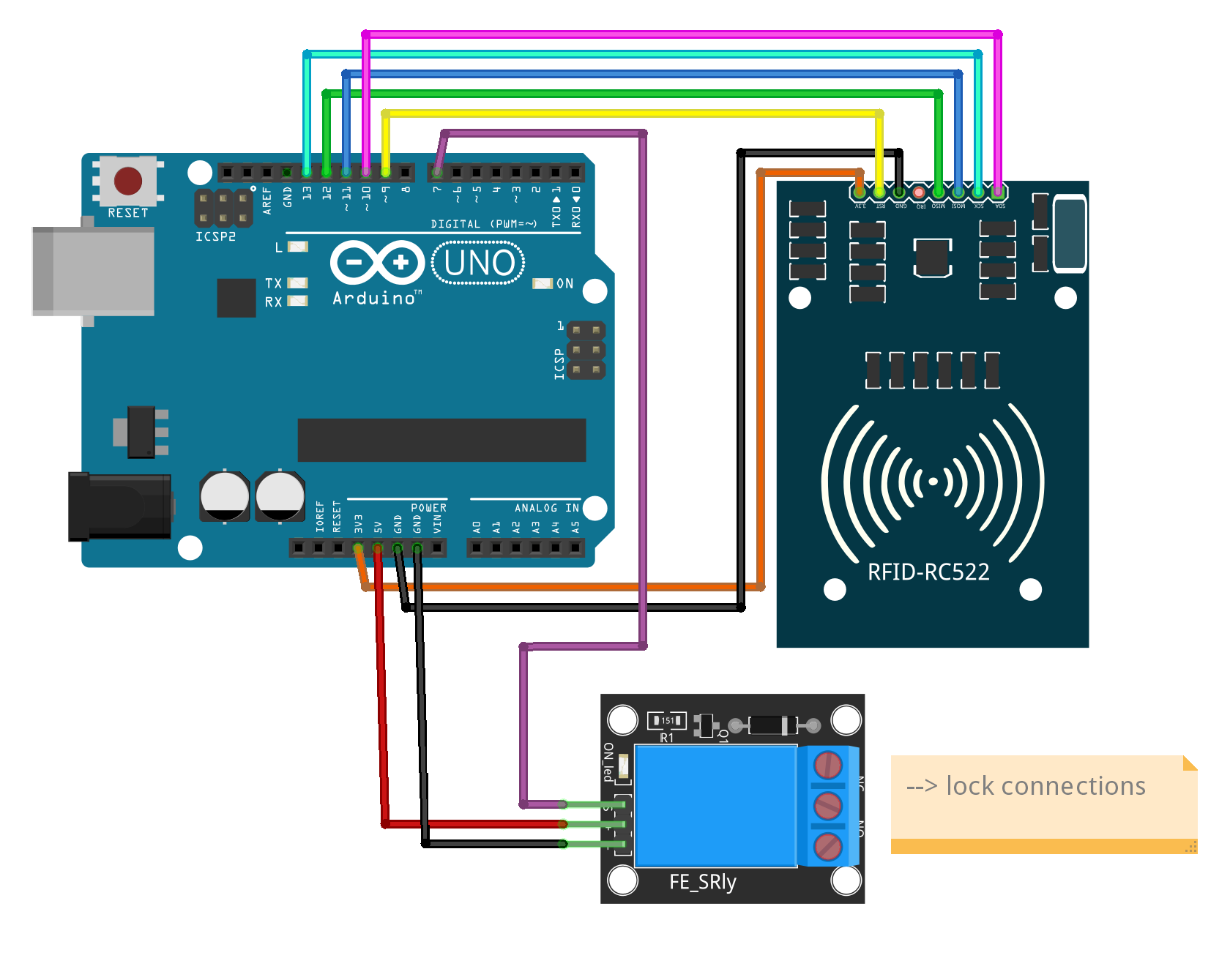
In the diagram, the RC522 is connected to Arduino as follows: SDA/SS → 10, SCK → 13, MOSI → 11, MISO → 12, RST → 9, GND → GND, and 3.3V → 3.3V. The IRQ pin is unused. The SS_PIN and RST_PIN constants assign pins 10 and 9 to the library.
The relay module uses VCC → 5V, GND → GND, and IN → Arduino pin 7. The relaySignalPin = 7 constant selects the output that controls the relay. The COM, NO, and NC terminals allow a separate circuit to be connected using either a normally open or a normally closed contact as needed.
The authorizedUID array contains the bytes of the authorized card’s identifier. {0xA3, 0x2F, 0x91, 0x0C} is only an example and must be replaced with the UID of your own card. To retrieve it, first upload the code, open the Serial Monitor at 9600 baud, present the card, and copy the bytes shown after UID: into the array, using hexadecimal 0x notation. If your card has a different number of bytes, adjust the number of array elements.
The line const byte authorizedUIDLength = sizeof(authorizedUID) / sizeof(authorizedUID[0]); automatically computes the length of the authorized UID. The isAuthorized() function first checks the UID length, then compares each scanned byte with the stored value. A single mismatch means that the card is not authorized.
The relayActive variable stores the current relay state. The setRelay(bool active) function updates this variable and executes digitalWrite(relaySignalPin, active ? LOW : HIGH);: when active is true, LOW activates the relay; otherwise, HIGH deactivates it. This is the opposite of an active-HIGH output.
In setup(), the sketch sets pin 7 HIGH before configuring it as OUTPUT, then calls setRelay(false) to keep the relay deactivated. The instructions Serial.begin(9600), SPI.begin(), and rfid.PCD_Init() start the serial connection, SPI bus, and RFID reader.
Inside loop(), rfid.PICC_IsNewCardPresent() checks whether a new card has been detected. If so, rfid.PICC_ReadCardSerial() reads its UID. The printUID() function shows this identifier in the Serial Monitor, even for unauthorized cards, so you can obtain your own card’s UID easily.
The condition if (isAuthorized()) decides whether the relay may be switched. If the UID matches, setRelay(!relayActive); toggles the state from off to on or from on to off. If the UID does not match, the relay stays unchanged. There is no automatic relocking timer: to switch the state again, present an authorized card again.
The rfid.PICC_HaltA() and rfid.PCD_StopCrypto1() calls finish handling the card, while delay(300) adds a short pause. Remove the card from the reader and present it again for another scan.
For a dedicated introduction to the reader, see the NEMIA TOOLS guide to using the RC522 RFID reader with Arduino. This project focuses mainly on UID authorization and relay control.
Important: the RC522 must be powered at 3.3 V. With an Arduino UNO, 5V signals sent to the RC522 inputs need suitable logic-level adaptation unless already built into the module; the diagram shows the logical connections. Also check the relay input type (active LOW), contact ratings, and the load power supply. RFID UIDs can be cloned, so this is an educational project, not a certified access-control security system.